New Google Features Announced at BETT’26
In January our team attended Bett UK 2026 in London. Bett UK is an annual Ed Tech event where over 35,000 people attend to hear and see what over 600 exhibitors have for the year ahead.
During the event, the Google for Education team announced over 50 new features coming to the Google ecosystem. Check out the Launch Guide for details on every feature and some of the pilots that have become available.
We’re excited about NotebookLM! To help you explore the features Google announced, we’ve created a new Notebook containing this blog post and all the announcements. You can ask deeper questions about every upcoming feature right here.
Here our our top 10 feature updates from the recent announcements 📣
1. Gemini in Workspace
Availability: Coming soon. Check the table below to see availability of each feature for your edition of Workspace.
Previously only available in the Google AI Pro for Education add-on, Gemini in Docs, Sheets, Slides, Vids, and Forms are being added to Education Plus and the Teaching and Learning add-on available for users 18+. Gemini in Gmail will soon be available to everyone.
Coming to Education Fundamentals: (the free version)
- Gemini in Gmail: Quickly draft emails and summarize long threads with Help Me Write, Suggested Replies, and AI Overviews for email threads.
Coming to Education Plus and the Teaching and Learning add-on (the paid versions):
- Gemini in Docs: Create content in seconds with Help Me Write and Gemini in the side panel of Docs.
- Gemini in Slides: Enhance presentations with the ability to create original images and slides in the side panel of Slides.
- Gemini in Forms: Quickly create forms and see AI summaries of responses.
- Gemini in Vids: Create polished videos with a simple text prompt or from existing slides.
- Gemini in Sheets: Organise and analyse data with AI custom functions and Gemini in the side panel of Sheets.
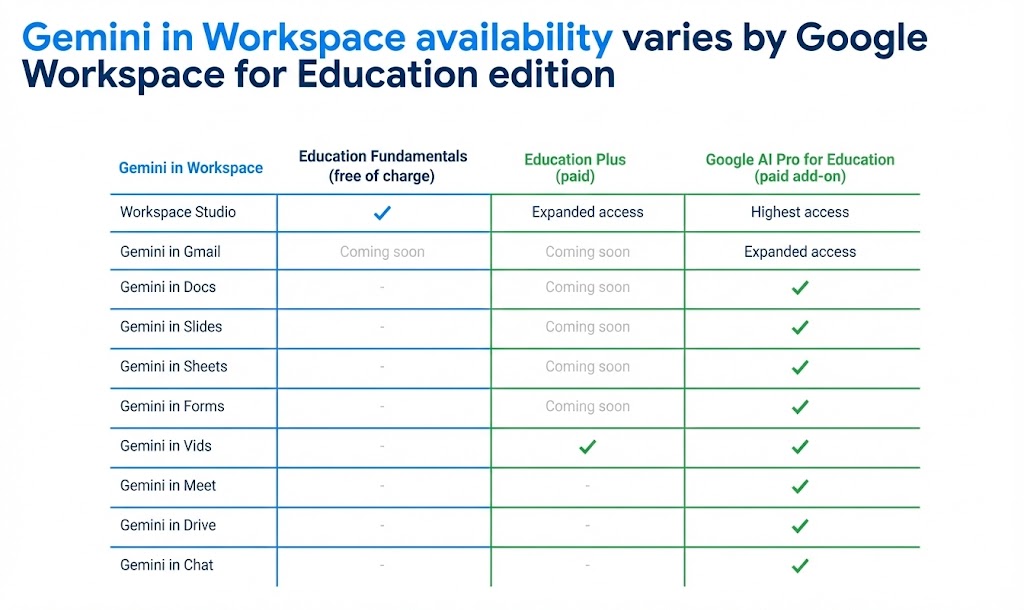
Speak to us to learn more about purchasing Education Plus and the Google AI Pro for Education add-on for your school!
Find out more about the premium AI features coming to Google Workspace here.
2. Empower higher education students with Gemini study tools
Google have expanded access to Gemini in Classroom for students in higher education who are 18 years of age and older to help them study and learn. This provides a direct-to-student offering that helps students learn, practice, and grow using AI. It transforms the study experience by allowing students to access the Gemini tab directly in Classroom to access new learning tools.
This feature is specifically targeting users over the age of 18 in a Higher Education setting with a set of four new starter tiles within the Gemini app: Help me Learn, Quiz me, Flashcards, and Study guide.
To find out more about how Google is collaborating in the Higher Ed space check out this post.

3. Classroom app in Gemini
Availability: All editions in the coming weeks
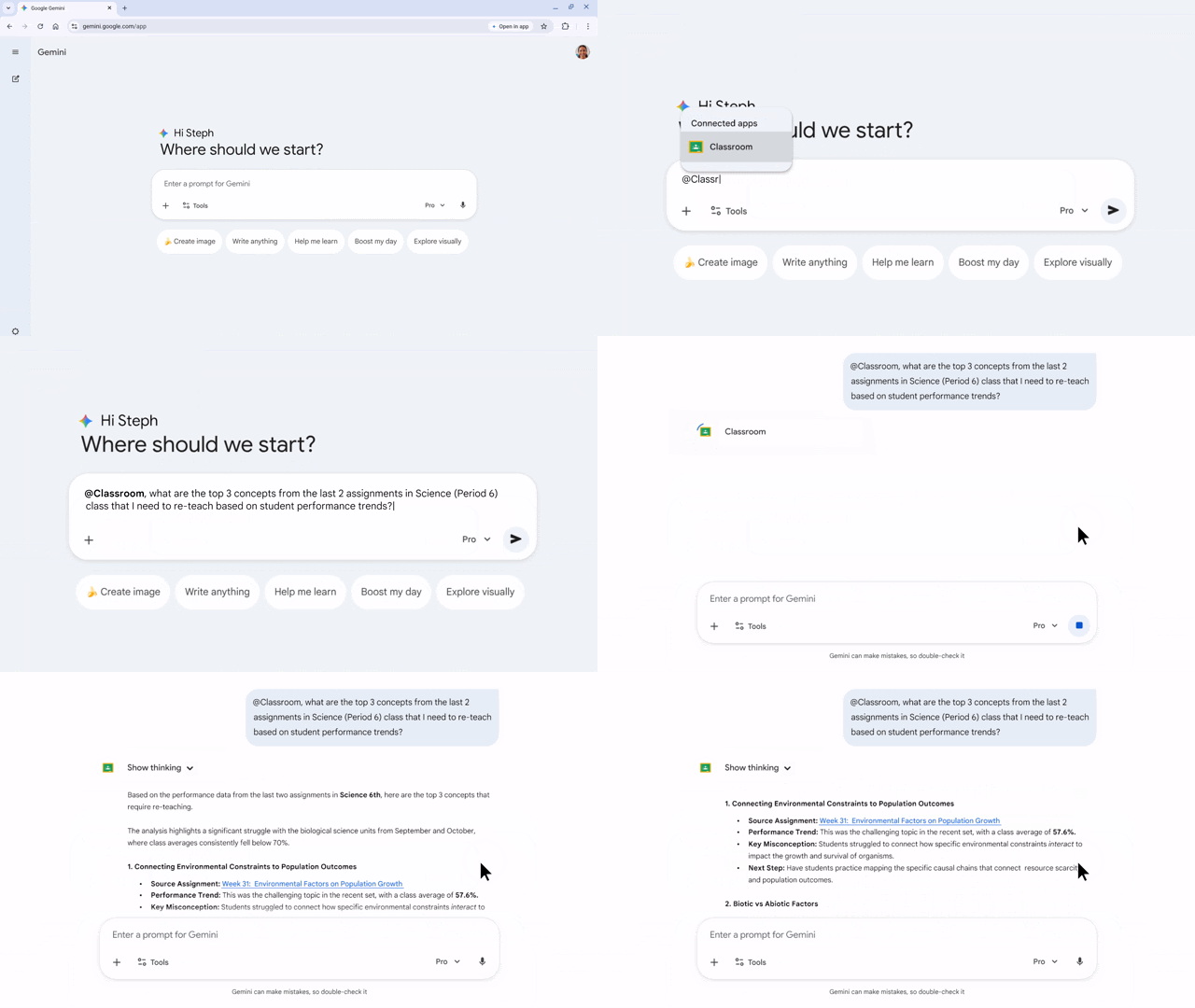
Save on time-consuming tasks by allowing Gemini to collaborate with the Classroom app. Let Gemini use context from your classes to get help drafting assignments or summarizing student progress.
4. Audio Lessons in Google Classroom
Availability: Rolling out now to all editions
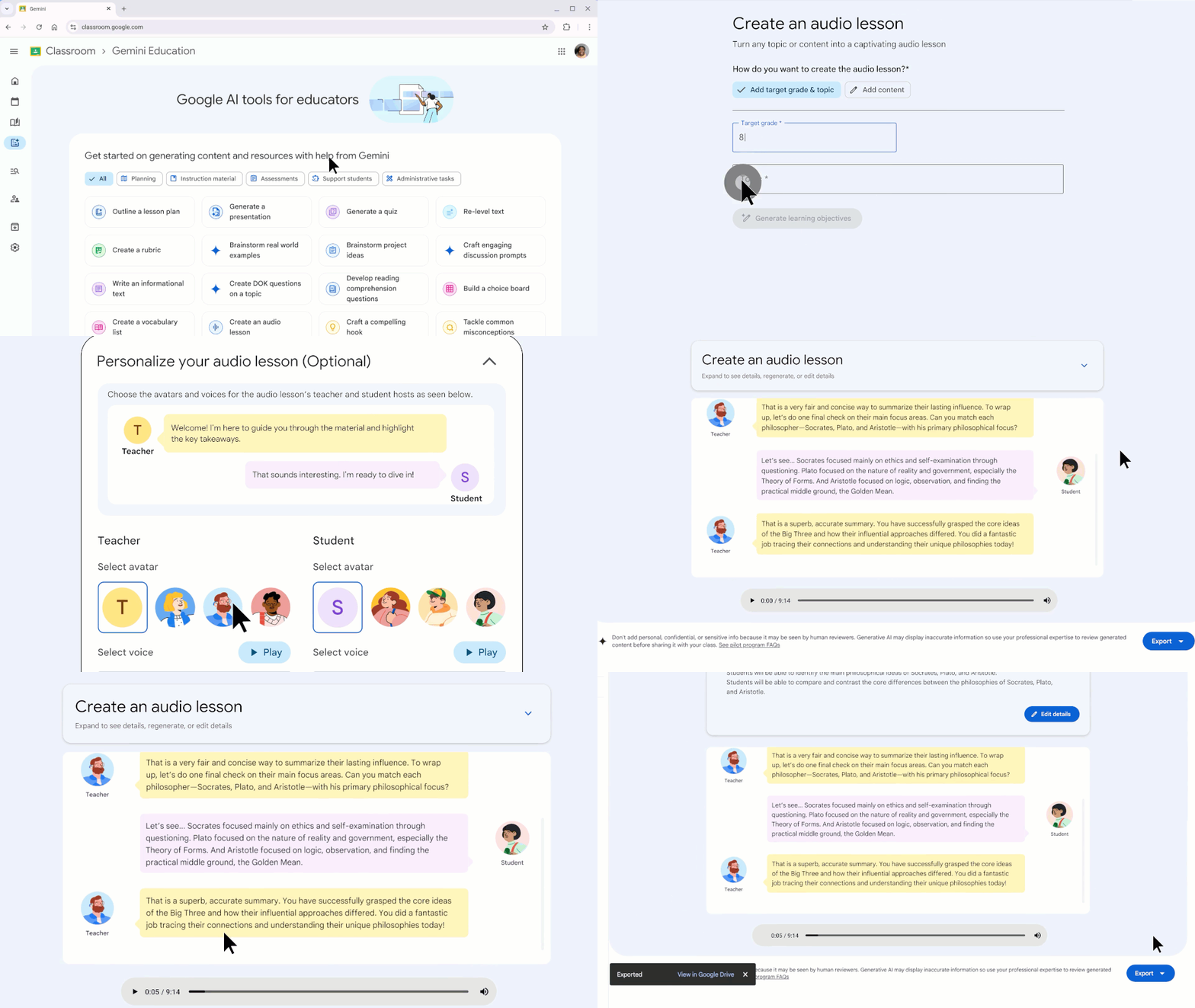
Generate and share audio lessons in the form of podcasts with conversations between two people, so students can engage deeply and learn on the go. As an added bonus you can export the dialogue as text and images straight into Google Slides to share with your students!
5. Insights for teacher-led Gems and NotebookLM
Availability: Coming soon to Education Plus and the Teaching and Learning add-on
Educators will soon see actionable insights, providing opportunities for a transparent, reflective approach to AI learning experiences.

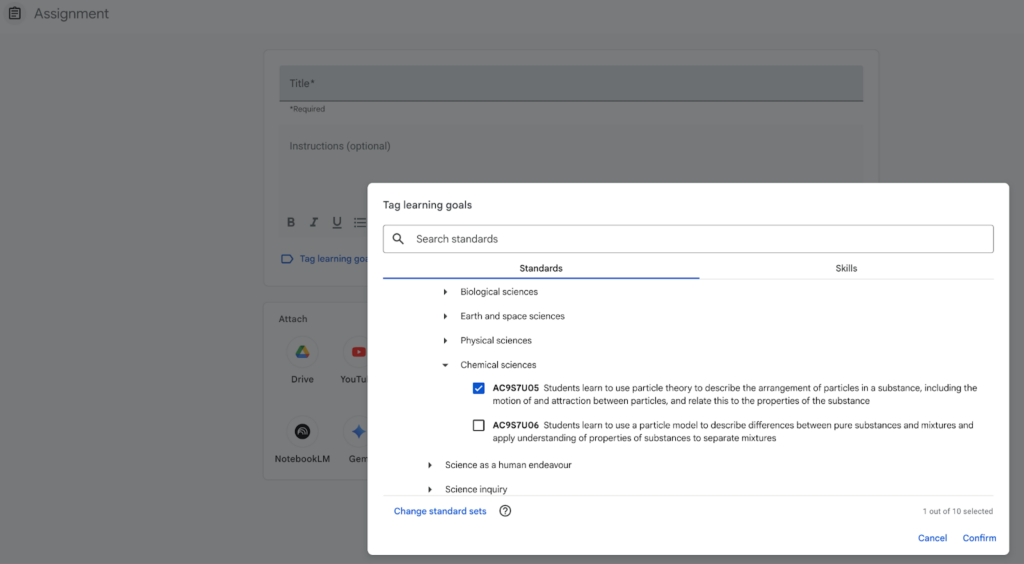
6. Tag assignments with learning standards to track student progress and understanding
Availability: Sign up for the pilot nowto see this in action at your school
To support data-driven instruction, Google partnered with 1EdTech and Common Good Learning Tools to bring standards to Google Classroom. Pilot participants will have access to learning standards from the UK, Australia, Canada, Japan, Brazil, Mexico, and soon Italy.
7. Automate tasks with Google Workspace Studio
Availability: Rolling out now to all editions
Education users can now create AI agents to automate repetitive, everyday work. Let Gemini-powered agents handle inbox and document management, meeting-note analyses, and project tracking so you can focus on teaching and learning.
You might be collecting info from the families of your new classes using Google Forms and want to synthesise this into a summarised table in Google Sheets as well as sending the summary to yourself in Chat.
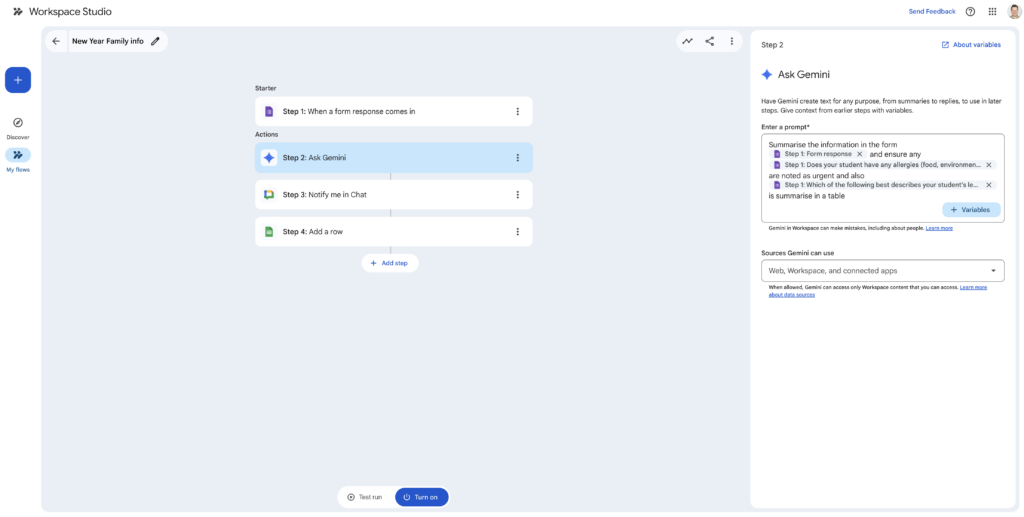
Workspace Studio will be available to all Education users, though your administrator may need to enable it first.
8. Audio and Video recording in Google Classroom
Availability: Rolling out now to Education Plus and the Teaching and Learning add-on
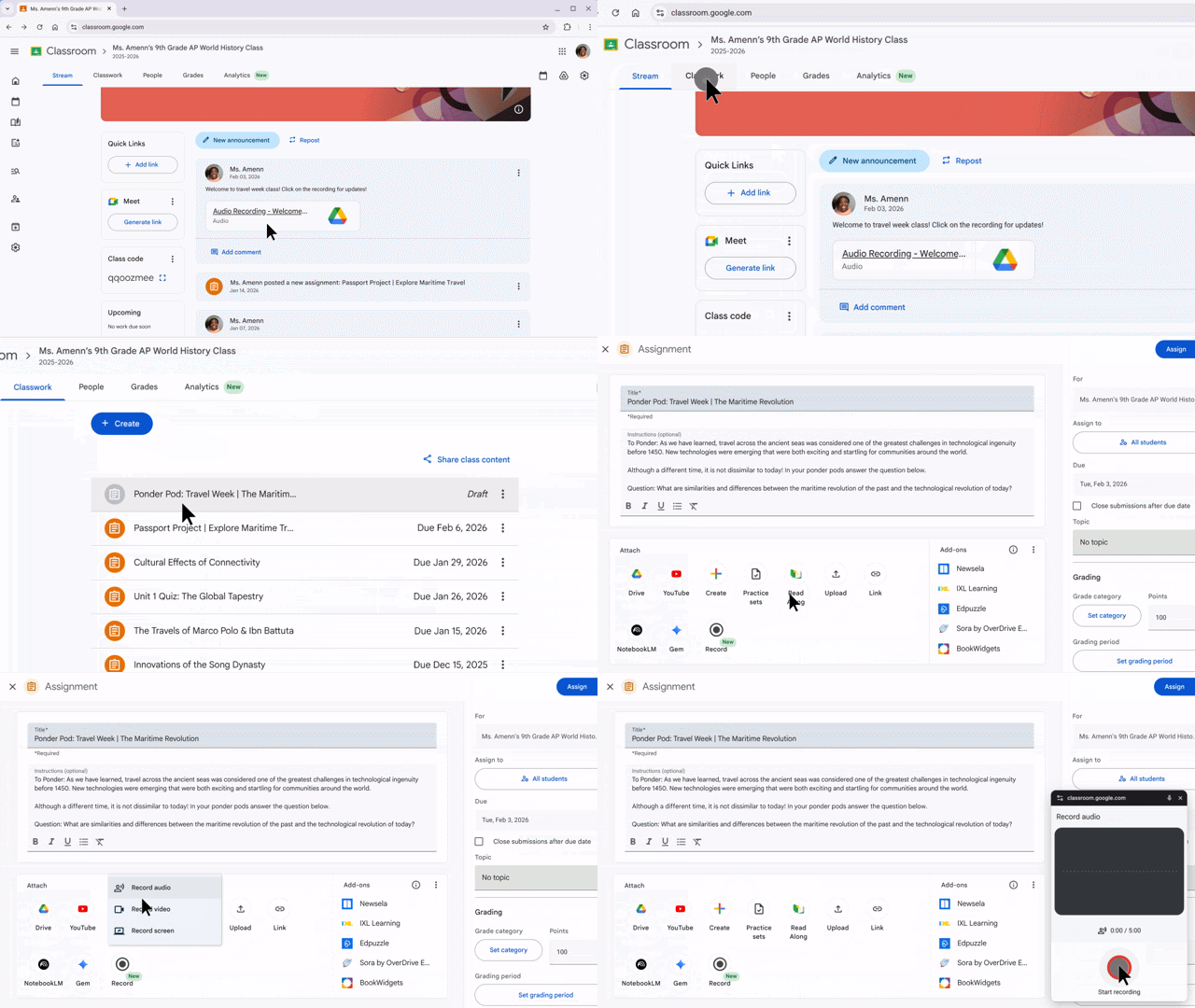
With seamless audio and video recording in Classroom, Educators can provide personalized feedback across every stage of the Classroom workflow, from announcements to grading while students can demonstrate understanding through multimodal assessments in Classroom.
9. Class Tools feature updates
Availability: Rolling out now to users with Managed Chromebooks and Education Plus
– Screen sharing
Use the Class tools display app to mirror content from any teacher or student device to a screen or interactive display at the front of the room. It’s the perfect way to showcase work, spark discussion, and drive active participation during lessons.
– Live Annotations
Instantly mark up content to emphasise important details. With on-screen annotation in Class tools, educators can visually guide students through instructions and help them focus on what’s important.
Speak to us about how to turn this feature on in the Admin console as well as any other queries you have about Admin console setups for your school or organisation.
Find out about even more Chromebook and ChromeOS feature updates in this post from Google.

10. Generated image and video verification
Availability: Rolling out now to all editions
With SynthID technology now in the Gemini app, you can upload any image, video, and soon, audio file and determine if it was generated by Google AI. This tool helps increase content transparency as generative media becomes increasingly prevalent and high fidelity.
Check out this post for even more updates from Google about new security and AI detection features.
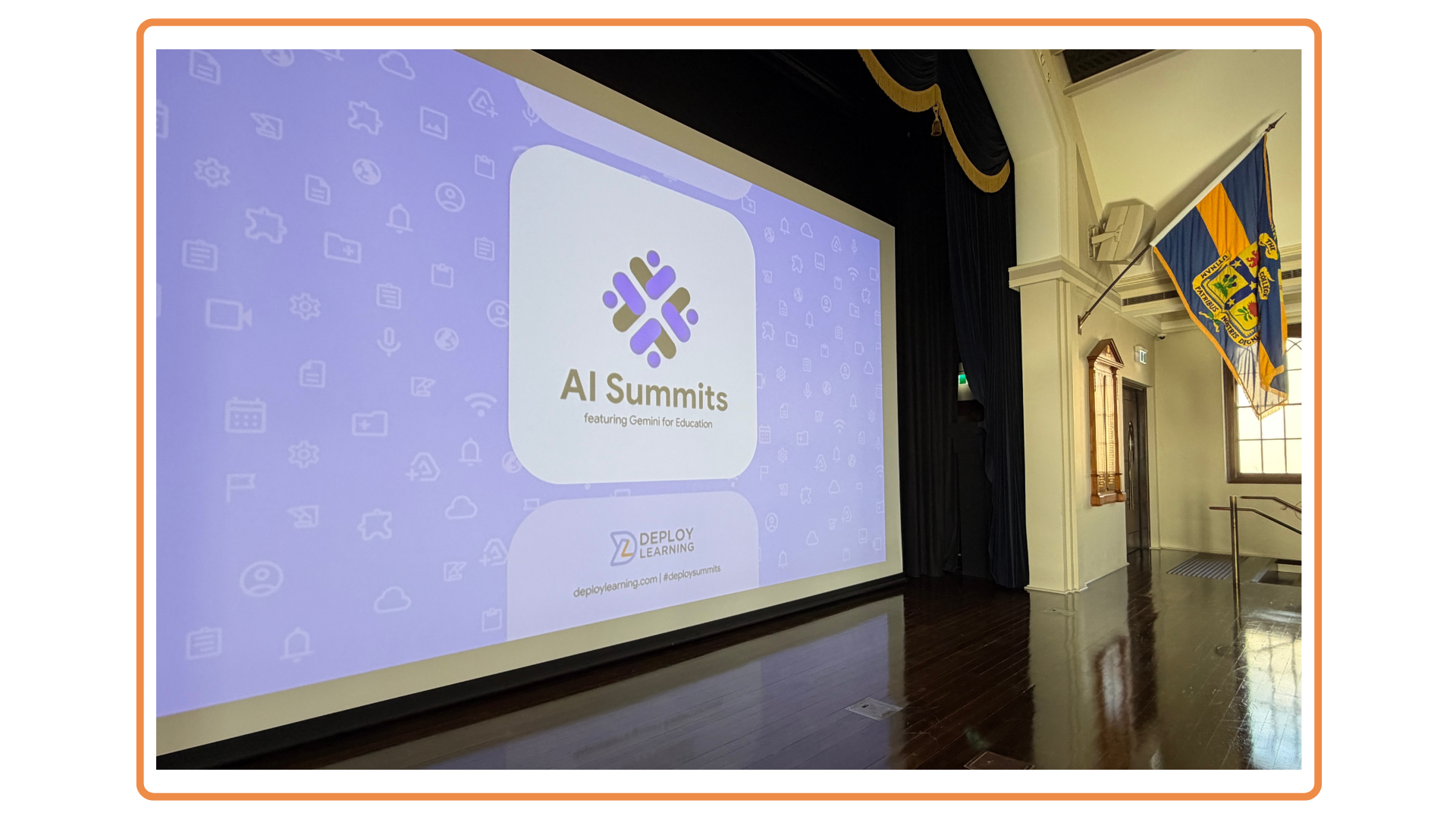
We made a little video with the sights and sounds form Google’s presence at BETT UK.
Stay Curious!
📖 Learn on your own time – Head over to our online courses store to check out the different courses we have on offer from our Level 1 and 2 Google Certified Educator Courses to the Gemini in Education course.
🤝 Professional Development – Reach out to us to discuss how we can partner with your school to support your professional development journey.
📣 Events – Click here to explore and register for our free-of-charge events and workshops in 2026. We are partnering with Google Australia to elevate your teaching skills and future proof your career dpln.au/google26